
You’ll find the OptiSigns Pro is a compact, quiet Pentium‑powered player that’ll handle smooth 4K playback and multiple apps without noisy fans or server‑grade cost. It’s passively cooled, reliably timed for auto power‑on, and offers Wi‑Fi 6 plus gigabit Ethernet, HDMI‑CEC and RS‑232 for flexible installs. The OptiSigns cloud and mobile portal simplify updates, templates and analytics, with a free tier for small pilots and paid plans for scale — keep going to see detailed specs and tradeoffs.
Some Key Takeaways
- Solid Pentium quad‑core hardware and 4 GB RAM handle 4K playback and multiple apps with passive cooling and low noise.
- Purpose‑built OptiSigns software plus cloud portal enables easy remote management, templates, and 160+ app integrations.
- Dual Wi‑Fi 6 and gigabit Ethernet, HDMI‑CEC and RS‑232 support flexible connectivity and legacy AV control.
- Subscription model (including a limited free tier) adds analytics, advanced apps, and multi‑site control for scaling.
- Best for reliable, fuss‑free signage deployments—more capable than streaming sticks, simpler than enterprise players.
Quick Verdict and Who Should Buy the OptiSigns Pro Digital Signage Player
While it’s built specifically for signage, the OptiSigns Pro stands out as a compact, reliable player that balances performance and manageability better than many generic media boxes. You’ll find it ideal if you want fuss-free deployment, remote management, and modern integrations without overpaying for server-grade kit. Compared to DIY streaming sticks, it’s more robust and scalable; versus enterprise players, it’s simpler and cost-effective. Installation tips are straightforward—mount, connect, enroll—and OptiSigns’ customer support guides you through subscription tiers and remote setup. Buy it if you value streamlined maintenance, rapid content rollout, and forward-looking software ecosystems. It also supports remote management to simplify ongoing content updates and device monitoring.
Hardware and Performance: CPU, Memory, Cooling, 4K Output, and Reliability
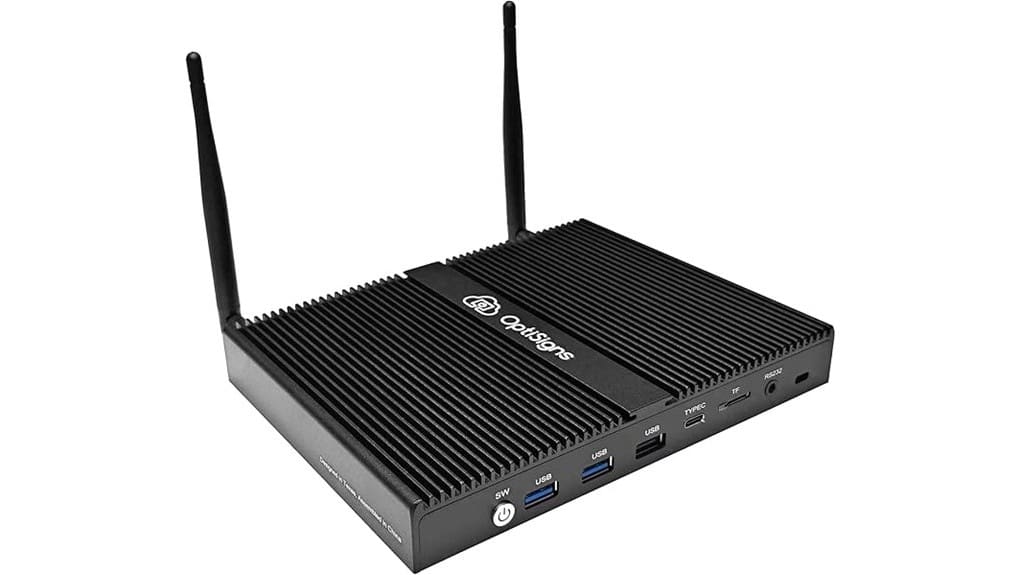
If you liked the Pro for its manageability, you’ll also appreciate what’s under the hood: an Intel Pentium quad-core CPU paired with 4 GB of RAM and a 128 GB SSD gives the player enough headroom for smooth 4K playback, multiple simultaneous apps, and frequent content updates without hiccups. You’ll find passive cooling keeps fan noise out of the equation and reduces failure points; in practice thermal throttling is rare under sustained 4K loads. Boot resilience is solid—RTC wake and auto power‑on minimize downtime. Compared to beefier players, the Pro trades extreme headroom for compact, reliable, efficient operation. Many customers use the player to drive backlit letter boards for clear, attractive messaging.
Software, Management, and Integrations: OptiSigns Player, Portal, Apps, and Security
Because OptiSigns pairs a purpose-built player with a cloud portal and mobile admin app, you get a tightly integrated software stack that’s easier to manage than generic media players. You’ll appreciate streamlined deployment, remote updates on a secure Linux OS, and a designer that speeds content creation. The portal’s cloud integrations and 160+ apps broaden data sources; templates and app catalog outpace typical players. Content analytics give actionable metrics so you can iterate displays quickly. Subscription tiers add features; the free plan limits branding and scale. Overall, you get a focused, modern toolset optimized for continuous, secure digital signage. The company also provides resources and ideas tailored for users of rotating message signs, including templates and content suggestions for improving message engagement with rotating message signs.
Setup, Connectivity, and Day‑to‑Day Features: Wi‑Fi 6, Ethernet, HDMI‑CEC, RS‑232, RTC Wake
When you plug in the Optisigns Pro, setup is straightforward and fast thanks to dual connectivity options: Wi‑Fi 6 for flexible wireless installs and gigabit Ethernet for stable, high‑bandwidth feeds. You’ll appreciate HDMI‑CEC and RS‑232 for tight AV control and legacy device integration, plus RTC wake and auto power‑on for scheduled reliability. Compared to similar players, the passive‑cooled Pentium platform balances performance and silence. Use the OptiSigns portal for remote diagnostics and run periodic latency testing to validate stream performance. Overall, it’s a modern, practical choice if you want dependable, remotely manageable signage infrastructure. It also pairs well with rotating sign stands to create eye‑catching, dynamic displays.
Cost, Licensing, and Real‑World ROI: Subscription Tiers, Free Plan Limits, and Deployment Examples
Having reliable connectivity and remote management in place sets the stage for evaluating ongoing costs and return, and the OptiSigns Pro pairs its hardware with a subscription model you’ll want to weigh against deployment scale and feature needs. You’ll compare subscription tiers: a free plan supports up to three branded screens; paid tiers enable advanced apps, templates, and multi-site control. Factor deployment costs—hardware, installation, connectivity, and license fees—against reduced staffing and faster content updates. For small pilots the free tier can prove ROI quickly; larger rollouts favor mid or enterprise tiers where automation and analytics accelerate payback and lower total cost. Many customers streamline operations by pairing digital players with time-saving letter systems to simplify message creation and update workflows.
Some Questions Answered
Does the Player Support Touchscreen Overlays and Touch Interactivity?
Yes — you can use touch overlays and interactive screens with the player. You’ll get capacitive compatibility for modern touch panels and gesture customization via the OptiSigns software, letting you map taps, swipes, and multi‑touch actions. Compared to basic players, this combo gives more responsive interactivity and flexible UX control. You’ll still depend on the overlay vendor for drivers, but the player’s built‑in features favor innovative, customizable touch deployments.
Can I Run Third-Party Apps Outside the Optisigns Ecosystem?
Yes — you can run third-party integration, but it’s limited. You’ll mainly use OptiSigns’ ecosystem and apps; direct custom containers or arbitrary apps aren’t broadly supported out of the box. Compared to open platforms, this is more locked-down but better optimized and secure for signage. If you need custom containers or deep integrations, plan on using supported APIs, contacting OptiSigns for enterprise options, or deploying external devices for full flexibility.
What Warranty Length and RMA Process Are Included?
You get a one‑year warranty duration covering defects; you’ll want extended coverage if you need longer protection. For return procedures, contact OptiSigns support to open an RMA, follow their troubleshooting, ship with specified labels, and expect repair or replacement. Compared to enterprise tiers, this is standard; you’ll appreciate paying for extended plans if uptime and advanced support matter. It’s efficient, predictable, and aligned with innovative deployments.
Is There Local Storage Encryption for Sensitive Content?
Yes — the device supports encrypted storage for sensitive content, though specifics depend on OptiSigns’ configuration. You’ll get secure local SSD encryption and OS-level protections, and key management is handled by the platform’s secure Linux environment with regular updates. Compared to consumer players, this offers stronger data protection and centralized key control, but verify whether keys are customer-managed or platform-managed to match your compliance and innovation-driven deployment needs.
Can the Player Boot and Play Without an Internet Connection?
Yes — you can boot and play offline. Your player supports offline playback and kiosk mode, so it’ll start, load cached content, and lock into a single app without internet. Compared to cloud-only boxes, this hybrid approach gives resilience and predictable display behavior. You’ll still get best results with occasional connectivity for updates and management, but for remote or secure sites you’ll enjoy continuous, autonomous signage operation and simplified deployment.