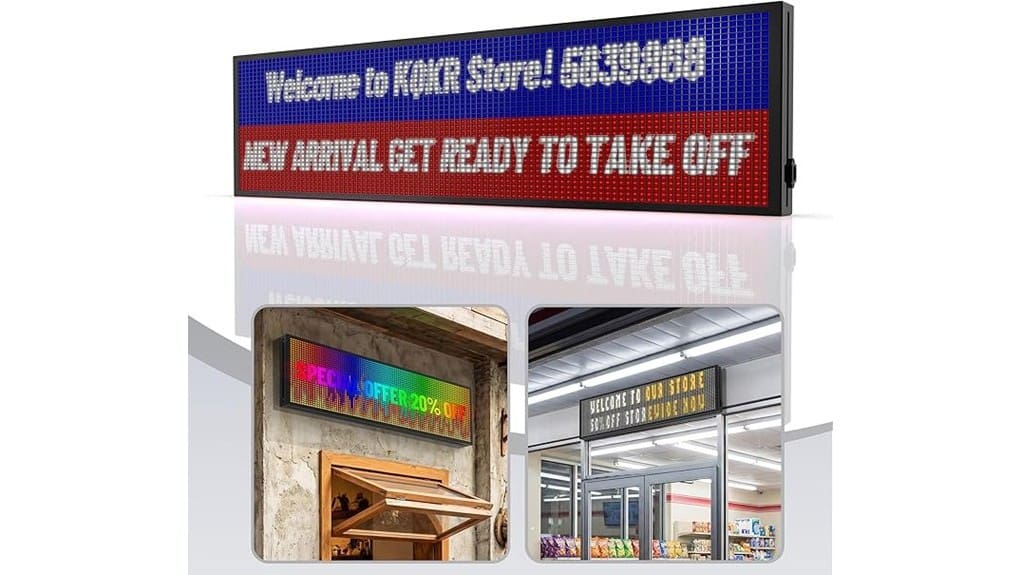
You’ll get a bright, semi‑outdoor P10 RGB sign that’s readable to about 100 feet, with smart Wi‑Fi control, animations, and IP45 weather resistance for lower lifecycle cost. Setup is quick via apps for iOS, Android, and Windows, and daily edits and scheduling are reliable. Color and motion are strong for logos and scrolling, though very complex video may stutter compared with premium models. Keep going to see full specs, alternatives, and who it’s best for.
Some Key Takeaways
- Bright P10 panel readable up to 100 feet with accurate colors for logos and bold palettes.
- WiFi apps (iOS, Android, Windows) offer easy setup, templates, scheduling, and instant sync.
- IP45 weather resistance and energy-efficient design suit semi-outdoor small-business use.
- Smooth scrolling and simple loops, though complex high-frame effects may show minor stutter.
- Includes power cable, mounting hardware, quick-start guide, and two-year protection for lower lifecycle cost.
Is the Kochenkore P10 Programmable LED Sign Worth Buying?
Deciding whether to buy the Kochenkore P10 Programmable LED Sign comes down to matching its strengths—high-brightness P10 panel, readable up to 100 feet, RGB animations, and smart WiFi control—to your needs. You’ll weigh visibility and adaptability against cost. An affordability analysis favors this sign if you need durable, high-impact messaging without custom fabrication costs. Compare alternatives: cheaper panels cut brightness or features; premium units add weatherproofing and lifespan. You’ll value long term durability here—IP45, energy efficiency, and a two-year protection reduce lifecycle expense. If innovation and reliable outdoors use matter, it’s a strong contender. The site offers a range of related products including backlit letter boards to help you create attention-grabbing messages.
What You Get in the Box and Key Specs (Size, Weight, IP45, WiFi)
When you open the box, you’ll find the Kochenkore P10 Programmable LED Sign (LEDZZP-04) and a compact set of accessories sized to get it running quickly: the 63 x 14 x 0.4-inch P10 panel (25 lb), a power cable, mounting hardware, and a quick-start guide with links to multilingual software and video tutorials. The packaging contents are lean and purposeful—no excess parts. You’ll appreciate IP45-rated weather resistance for semi-outdoor installs and WiFi control for instant edits from phone or PC. At 25 lb the panel balances portability and presence, comparing favorably to heavier commercial units while staying installation-friendly. The sign is ideal for businesses wanting eye-catching rotating displays that help communicate messages effectively.
Real-World Display Performance: Brightness, Visibility, Animations, and Range
After unpacking and getting the P10 mounted, you’ll notice the screen’s brightness and clarity immediately affect how messages perform in real settings. In brightness testing the P10 stands out; outdoors its high output keeps text legible to the advertised viewing distance and beyond, outperforming many indoor panels. You’ll appreciate color accuracy for logos and bold palettes, though extreme close-up viewing reveals pixel spacing. Animation smoothness is solid for scrolling and simple video loops, but complex high-frame effects can show minor stutter compared with premium models. Overall range, visibility, and dynamic display make it a strong innovative signage choice. These attributes make it especially effective for businesses that rely on outdoor visibility to attract attention.
Setup, Software Experience, and Daily Operation (iOS/Android/Windows)
Although the hardware mounts quickly, you’ll judge the Kochenkore P10 by how its setup software performs across devices, and here it mostly delivers a straightforward, consistent experience on iOS, Android, and Windows. You connect via Smart WiFi, follow multilingual prompts and video tutorials, and get the sign online in minutes. App integration is solid: mobile apps mirror the Windows editor, so workflows stay consistent. You’ll appreciate user customization with templates, animations, and scheduling; tweaks sync instantly. Performance is reliable, though advanced animation editing feels tighter on desktop. For innovators, the balance of simplicity and control is efficient and competitive. The site also offers guidance on designing eye-catching messages for programmable signs to help users make the most of their display.
Who Should Buy It and 3 Alternative LED Sign Options to Consider
Strong setup software and reliable WiFi control make the Kochenkore P10 a solid pick for businesses that need bright, programmable signage without a steep learning curve. You should buy it if you’re a small business or event planner wanting high visibility, outdoor-tolerant RGB displays with easy mobile and desktop editing. It’s especially useful where dynamic messaging, low power use, and a 2-year protection plan matter. Alternatives to evaluate: (1) Novabrand P10 — similar brightness, simpler UI; (2) LumenSign Mini — compact for countertops, high contrast; (3) PixelWave Pro — advanced animations, higher refresh for video. Compare features, durability, and connectivity. The site sells products related to illuminated sign letters and accessories for display needs.
Some Questions Answered
Does It Come With Mounting Hardware and Templates?
Yes — it includes basic mounting hardware and mounting templates so you can align and secure the sign quickly. You’ll get screws, brackets, and guide patterns; however, they’re utilitarian compared to heavier-duty commercial mounts. Use installation tips from the multilingual app and video tutorials to optimize placement, wind load, and power routing. If you need advanced anchoring or custom brackets for outdoor exposure, plan to source upgraded hardware separately.
Can I Schedule Messages for Specific Dates and Times?
Yes — you can schedule messages for specific dates and times using the sign’s calendar scheduling features. You’ll set one-off entries or recurring events via the WiFi app on iPhone, Android, or Windows. Compared to manual updates, this automated approach saves time and reduces errors. If you need complex rotations, the scheduler handles repeats, exceptions, and precise start/stop times, letting you deploy targeted campaigns with innovation and operational efficiency.
Is There Multilingual Support in the App and Display Presets?
Yes — you’ll get multilingual support: the app offers Language options and the device supports Preset languages for quick selection. You’ll compare language packs in the app, switch interfaces, and preview display presets side-by-side. That lets you evaluate translation fidelity, font rendering, and animation behavior before deploying. You’ll appreciate the streamlined workflow if you value innovation, since multilingual presets speed setup and guarantee consistent, professional messaging across locations.
What Is the Power Connector Type and Cable Length?
It uses a standard barrel connector and comes with an eight feet power cable, so you’ll plug into common supplies without adapters. Compared to proprietary plugs, the barrel connector is simple, reliable, and easy to replace. The eight feet length gives flexible placement options for storefronts or interiors, though you might need extension for larger venues. You’ll appreciate the pragmatic choice: familiar hardware that prioritizes compatibility and low-friction installation.
Are Firmware Updates Automatic or Manual via Wifi?
They’re manual updates you trigger via WiFi, though the system supports automatic updates if you enable the feature. You’ll compare convenience: automatic updates push firmware quietly, keeping security and features current with no action. Manual updates give you control to schedule and test changes, reducing risk during peak hours. You’ll want automatic updates for seamless innovation, but keep manual updates as a fallback for predictable deployment and troubleshooting.


