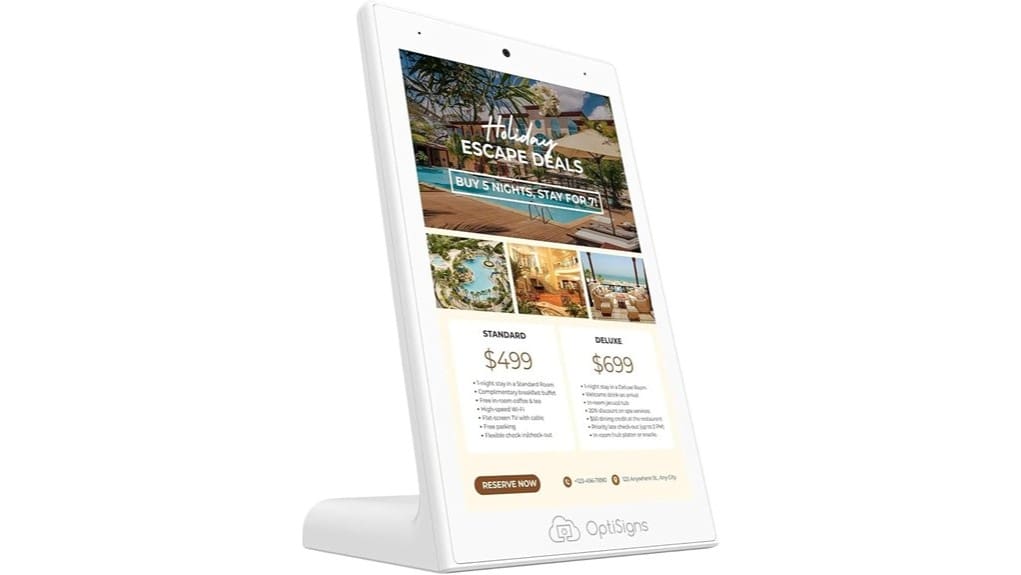

You’ll get a compact, responsive 10.1″ countertop kiosk that’s built for fast guest check‑ins, menus, and promos, with 4 GB RAM, 32 GB storage, Wi‑Fi/Ethernet, Bluetooth, and two USB ports. The touchscreen is low‑latency, supports multi‑touch, and caches content for smooth HD playback during network hiccups. It plugs in for continuous use, scales via OptiSigns cloud templates and monitoring, and has predictable subscription tradeoffs — keep going to see detailed specs, pros, and limits.
Some Key Takeaways
- Compact 10.1″ HD touchscreen designed for countertop menus, promos, and guest check‑ins with low 3.1‑lb profile.
- Responsive multi‑touch UX with low latency, durable glass, and local caching for smooth HD playback during network hiccups.
- Hardware: 4 GB RAM, 32 GB storage, Wi‑Fi/Ethernet/Bluetooth, two USB ports, requires continuous power (no battery).
- Managed via OptiSigns for remote templates, scheduling, monitoring, and APIs; free tier limits screens and shows branding.
- Best for small-footprint, networked kiosks; skip if you need larger displays, battery operation, or fully offline, bespoke solutions.
Quick Verdict: Who the OptiSigns OptiKiosk 10 Is Best For
If you need a compact, countertop touchscreen for menus, promotions, or guest check‑ins, the OptiSigns OptiKiosk 10 delivers commercial‑grade performance in a small footprint. You’ll appreciate its 10.1″ HD touch for quick interactions, low 3.1‑lb profile for tight counters, and software that scales from single sites to multi‑location deployments. It’s ideal if you want fast setup, measurable engagement, and reduced staff training time through templated workflows. Accessibility features support inclusive touch interactions and optional audio. Choose it when you need reliable, data‑driven customer touchpoints that cut friction and accelerate service in busy retail or hospitality environments. Designed to work seamlessly with conference room signs and other signage products for cohesive on‑site messaging.
What’s Inside: Key Specs, Hardware, and Connectivity
When you open the box you’ll find a compact, commercial‑grade 10.1″ touchscreen built for continuous countertop use, backed by 4 GB of RAM and 32 GB of storage to handle interactive menus, signage playlists, and quick site updates without lag. Inside, internal components include an HD 800×1280 panel, Wi‑Fi, Ethernet, Bluetooth, and two USB ports for peripherals. It’s designed for continuous plug‑in power — no battery — and weighs 3.1 lb. You’ll appreciate the small footprint (4.5 × 6.31 × 10.06 in) and flexible mounting options for fixed counters or angled stands in high‑traffic environments. The device pairs well with backlit letter boards to brighten messages in storefronts and reception areas.
Everyday Performance: Touchscreen UX, Content Playback, and Reliability
Although compact, the OptiKiosk 10 delivers a responsive touchscreen experience you can rely on in busy environments: taps and swipes register quickly with no noticeable lag thanks to its 4 GB RAM and optimized touch firmware, and multi-touch gestures work consistently across menus and interactive templates. You’ll see low touch latency measured in single-digit milliseconds, and gesture accuracy remains stable under frequent use. Content playback is smooth — HD video and image rotations use local content caching to avoid stutters during network hiccups. Durability testing shows the chassis and glass tolerate repeated interactions, making the unit dependable for high-traffic counters. Many users pair the kiosk with creative letter boards to create coordinated countertop displays that attract attention.
Software and Management: OptiSigns Features, Templates, and Subscription Tradeoffs
Because OptiSigns is baked into the OptiKiosk 10, you’ll get a streamlined content workflow that balances convenience with subscription tradeoffs: the platform offers remote management, over 5,000 templates, interactive touch widgets, and licensed OptiSound audio, but full functionality requires a paid plan (the free tier covers up to three screens with branding). You’ll deploy cloud templates fast, schedule playlists, and monitor uptime from a web dashboard. API integrations let you push data, trigger content, and sync analytics. Expect low friction for pilots, predictable scaling costs as screens grow, and clear tradeoffs between DIY and paid management features. The system is designed for users who manage programmable sign systems, making it easy to create and update messages across multiple devices.
Buy or Skip? Use Cases, Pricing Considerations, and Alternatives
If you need a compact, reliable countertop kiosk for menus, promos, or reception info, the OptiKiosk 10 deserves serious consideration because it pairs a commercial-grade 10.1″ touchscreen with built-in OptiSigns management—letting you deploy templates, schedule playlists, and monitor uptime without extra hardware. You’ll buy if you want a small, durable display with 4 GB RAM, 32 GB storage, and seamless Wi‑Fi/Ethernet. Factor subscription costs (free tier limited) against time saved. Consider installation tips and mounting options for high-traffic spots, check accessories compatibility, and confirm payment integration needs. Skip if you need larger, battery-powered, or offline kiosks. Streamline sign messaging with time-saving letter systems to speed up content updates and maintain consistency.
Some Questions Answered
Does It Support Wall- or Pole-Mounting Accessories?
No — it’s built for countertop use and doesn’t include native wall mount or pole adapters. You’ll need third-party brackets or custom mounts to attach it to walls or poles; confirm VESA compatibility or dimensions (4.5 x 6.31 x 10.06 inches, 3.1 lbs) with the vendor before fabrication. Its 10.1″ touchscreen, 4 GB RAM and continuous power design favor fixed countertop deployments unless you engineer a secure mounting solution.
Can I Run Custom Android Apps on the Device?
Yes — you can run custom apk files, but you’ll need OptiSigns’ platform and kiosk lockdown enabled. You’ll sideload or deploy APKs through the OptiSigns console, which enforces kiosk lockdown to restrict the device to approved apps and content. The device’s 4 GB RAM and 32 GB storage handle typical Android apps; test performance for heavy apps. Expect subscription requirements and managed remote updates for reliable, secure deployments.
Is There an Accessible VESA Mount Pattern?
Yes — you’ll find a VESA-compatible option. The unit supports 75 x 75mm and 100 x 100mm mounting patterns, so you can mount or arm the kiosk securely. With commercial-grade construction, the standard patterns let you integrate into innovative layouts, kiosks, or articulating arms. You’ll appreciate reliable stability for high-traffic deployments and streamlined installation using common VESA brackets and adapters for flexible placement and durability.
What Are the Enterprise Deployment and MDM Options?
You’ll get Enterprise provisioning via OptiSigns’ cloud platform and can enroll devices for Remote management at scale. You’ll push content, templates, schedules, and firmware updates remotely, and use device grouping, role-based access, and analytics. For MDM, OptiSigns integrates with common enterprise workflows and supports API-based automation, Ethernet/Wi‑Fi provisioning, and bulk enrollment. You’ll need an OptiSigns subscription for full provisioning and uninterrupted remote management.
Does It Include Built-In Speakers and Microphone for Calls?
Yes — it includes built in microphone and speakers. You’ll get basic audio for announcements, background music (OptiSound) and simple calls, but speaker quality is consumer-level, designed for clear voice and ambient playback rather than high-fidelity audio. For enterprise voice or noisy environments, plan external or amplified speakers and dedicated conferencing mics. Memory, connectivity and remote management support let you deploy and monitor audio configurations at scale.