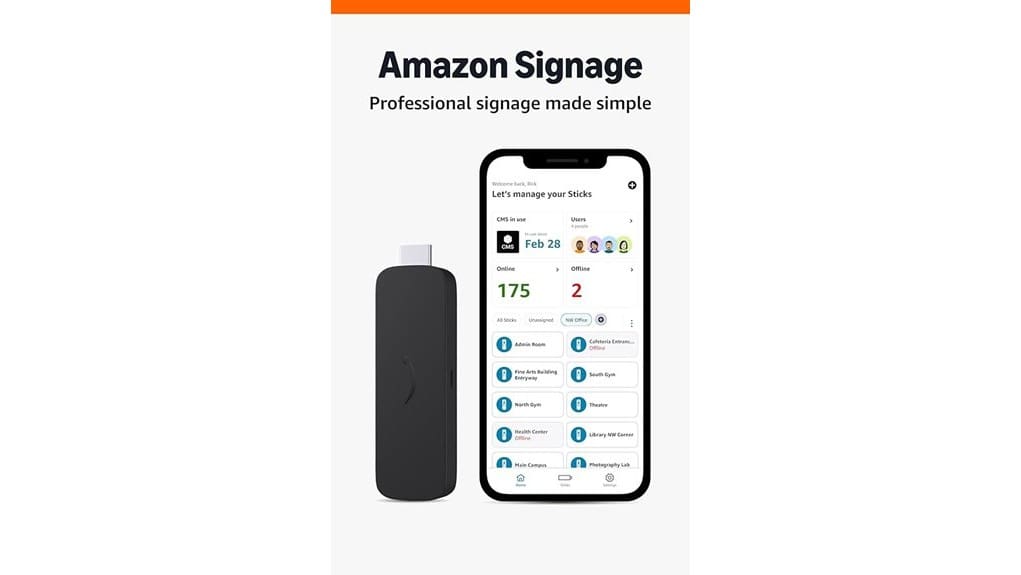
You’ll get a compact, enterprise‑focused 4K signage player that streams crisp video over Wi‑Fi 6E and handles simultaneous playback and background CMS tasks with its quad‑core CPU. It’s easy to provision from your phone, supports group management and kiosk mode, and offers secure boot, encrypted storage, and remote monitoring for unattended sites. Expect subscription‑based CMS features and optional adapters for USB/Ethernet. Keep going to see setup tips, pricing tradeoffs, and alternative players.
Some Key Takeaways
- Delivers crisp native 4K output and reliable playback for professional displays.
- Connects over Wi‑Fi 6E with quad‑core CPU for low‑latency, simultaneous playback and background tasks.
- Easy provisioning via free Amazon Signage mobile app with group management and remote updates.
- Secure boot, encrypted storage, automatic OS/CMS updates, and remote health monitoring enhance reliability.
- Best for scalable, managed deployments; alternatives recommended for heavy customization or offline needs.
Hardware, Ports, and Performance: What the Amazon Signage Stick Includes and How 4K/Wi‑Fi 6E and the Quad‑Core CPU Perform
Though it’s compact, the Amazon Signage Stick packs the ports and performance you need for professional displays: it outputs crisp 4K video, connects over Wi‑Fi 6E for faster, lower‑latency content delivery, and runs on a quad‑core CPU that handles simultaneous playback and background CMS tasks without stuttering. You’ll find essential ports for HDMI and power—and optional USB or Ethernet via adapters—so you can integrate sensors or local storage. Thermal throttling stays minimal with its efficient chassis, but plan ventilation and use mounting accessories to secure sticks behind screens. You’ll deploy confidently, knowing performance matches modern content demands. Design impactful signage with eye‑catching graphics to make your messages stand out.
Setup and Daily Use: Configuring Single and Multi‑Stick Deployments With the Amazon Signage Mobile App
Getting started is straightforward: use the free Amazon Signage mobile app to configure a single stick in minutes or provision dozens from your phone. You’ll pair devices, assign locations, and push profiles without technical staff. For multi‑stick sites, group management and remote provisioning save time—apply settings, reboot, or update fleets from anywhere. Daily use focuses on reliability: sticks auto‑launch CMS in kiosk mode and you monitor health and connectivity on your dashboard. Schedule maintenance windows, collect scheduled snapshots for status audits, and receive alerts for failures. The workflow keeps deployments lean, secure, and scalable for innovative teams. Many customers pair these with rotating message signs to maximize visibility and engagement.
Content Management and Compatibility: Supported CMS Platforms, Auto‑Update Behavior, and CMS Subscriptions
Which content management systems will work with your Amazon Signage Stick, and how do updates and subscriptions fit into your workflow? You’ll connect with leading CMS platforms—native Amazon Signage and popular third party integrations—so you can pick tools that match scale and creativity. CMS subscription tiers are required; choose plans that align with feature needs and device counts. The Stick supports automatic CMS updates to keep content flowing and minimize manual maintenance. You manage profiles and rollouts from the mobile app, while the device stays in kiosk mode for unattended operation. This setup prioritizes agility, predictable costs, and streamlined content delivery. Our product line focuses on helping sign users design eye-catching messages for programmable signs.
Security, Reliability, and Maintenance: Secure Boot, Encrypted Storage, Updates, and Remote Monitoring for Unattended Operation
Because your Signage Stick runs unattended in public or back‑office environments, Amazon built in secure boot, encrypted storage, and automatic updates to reduce risk and downtime. You’ll get remote monitoring and health metrics via the mobile app, so you can spot failures or unauthorized access quickly. The device resists basic physical tamper attempts and limits offline data exposure through encryption. Automatic OS and CMS updates keep patches applied without manual intervention. If an anomaly occurs, integrated logging supports fast incident response and rollback. Overall, management focuses on uptime, simple remediation, and scalable control across locations. The product is designed to help those who use signs to stand out safely in varied environments.
Who Should Buy It and Alternatives to Consider: Use Cases, Pricing Considerations, and Comparable Devices
If you run a small chain of retail stores, a restaurant group, or manage digital displays for corporate lobbies, the Amazon Signage Stick gives you an easy, low‑maintenance way to deploy 4K, CMS‑driven signage across multiple locations. You’ll benefit if you need scalable, secure, remotely managed retail displays or screens at transportation hubs. Consider costs: device price plus CMS subscription and optional support — budget for per‑unit licensing. Alternatives include ARM-based media players from BrightSign or Android TV boxes paired with enterprise CMS for more customization. Choose the Signage Stick for simplicity; pick alternatives for advanced customization or offline scenarios. For venues that need visible, attention-grabbing placements, don’t overlook rotating sign stands as a complementary way to increase message exposure.
Some Questions Answered
Can the Signage Stick Run Custom Web Apps or Local HTML Content Offline?
Yes — you can run custom webapps and offline html. You’ll deploy them through the supported CMS or local hosting; the stick launches content in kiosk mode so your webapps run unattended. It supports cached assets for offline html playback, and you’ll get secure boot and automatic updates to keep those apps stable. Use the mobile app to push profiles and monitor performance across devices for efficient, scalable deployments.
How Is Licensing Handled for Multiple Sticks Under One CMS Subscription?
You’ll manage licensing centrally: the CMS supports bulk licensing and seat pooling so you can assign many sticks under one subscription and redistribute seats as needs change. You’ll buy a pool of licenses, tag sticks by profile or location, and the CMS enforces active seats while unused licenses remain available. You’ll monitor usage and scale licenses from the app, keeping deployment flexible, cost-efficient, and ready for rapid expansion.
Does the Device Support Scheduling and Timezone-Based Content Rotation?
Yes — you can schedule content and use timezone scheduling to target displays precisely. You’ll set playlists and triggers in your CMS, then assign them to sticks or groups for automated content rotation across locations. The Signage Stick follows CMS schedules and respects device timezones, so you’ll deploy global campaigns that adapt locally. You’ll monitor and adjust schedules from the mobile app to keep messaging timely and consistent.
What Mounting Accessories or VESA Kits Are Available or Compatible?
You can use standard VESA mounts and compact wall mount brackets; a low-profile VESA kit secures the stick behind displays. For flexible placement, choose a swivel arm or articulating mount to angle the display and access ports easily. You’ll also find adhesive and bracket combos for kiosk installations. Pick mounts rated for your display weight, with cable-management features, so you’ll keep the setup sleek, secure, and easy to service.
Can the Stick Be Managed Alongside Other Amazon Devices in the Same Account?
Yes — you can. You’ll get account integration that lets the Signage Stick appear alongside other Amazon devices, so you’ll manage everything from one place. Use the mobile app for remote management: create profiles, organize by location, and monitor real-time status. That centralized control streamlines updates, security, and CMS sessions, letting you scale deployments confidently while keeping operations nimble and responsive for innovative digital-signage strategies.


