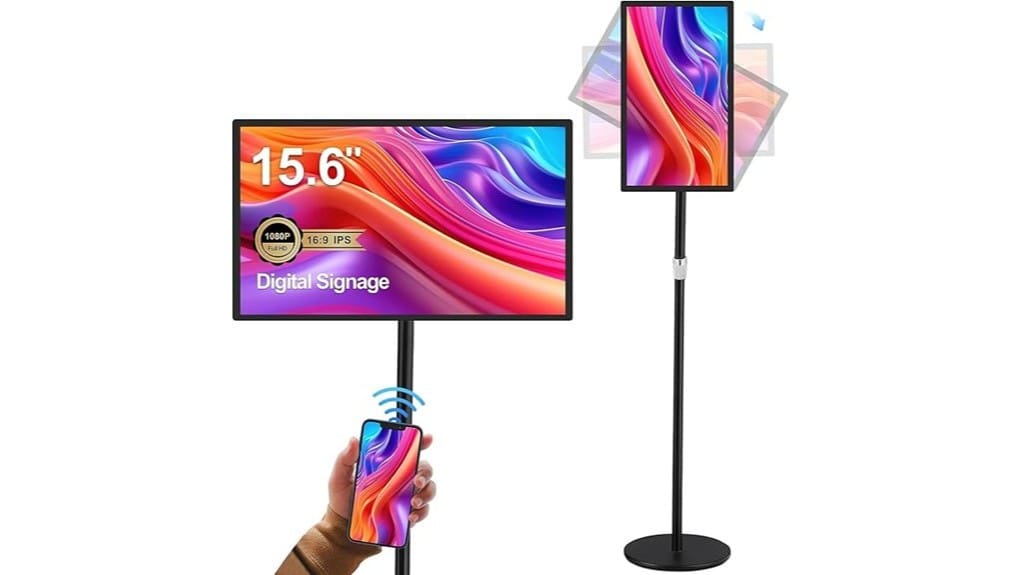
You’ll get a compact 15.6″ FHD IPS touch display with a built‑in 10,000 mAh battery that runs about 4–6 hours under normal use; it’s crisp, color‑accurate, and slim with useful I/O (RJ45, HDMI‑IN, USB‑A, MicroSD). Android 11 gives app flexibility but check codec/DRM for premium streams. Good for retail counters, kiosks and portable demos, not for all‑day stadium brightness. Keep reading and you’ll find detailed runtimes, connectivity notes and deployment tips.
Some Key Takeaways
- 15.6″ FHD IPS delivers crisp 1920×1080 visuals with accurate colors and a slim 10 mm bezel ideal for close-up signage.
- Built-in 10,000 mAh battery provides about 4–6 hours runtime, shortened by streaming, Wi‑Fi, and higher brightness.
- Android 11 platform supports apps and wireless mirroring, but verify codec and DRM compatibility for premium streams.
- Multiple inputs (RJ45, HDMI‑IN, USB‑A, MicroSD) offer reliable playback redundancy and networked scheduling.
- Best for retail counters, kiosks, and trade shows; not recommended for all‑day stadium‑level brightness or large wayfinding.
Detailed Hardware and Display Specs You Need to Know
While the 15.6″ digital signage display looks compact, you should focus on the core hardware and panel details that determine real-world performance. You get a 15.6″ FHD IPS panel (1920×1080) with a 10 mm ultra-narrow bezel and 8.5 mm thickness, prioritizing sleek integration. Inspect color accuracy on IPS for true-to-source advertising; calibration options matter. The 10-point capacitive multi-touch offers strong touch responsiveness, but test latency under heavy content. Check ports—RJ45, HDMI-IN, USB-A, MicroSD—for flexible input and networked playback. Demand measured specs, not marketing; hardware decisions will define durability and visual fidelity in high-traffic venues. We also offer complementary backlit letter board accessories for those who pair digital signage with tactile display accents to brighten messaging.
Battery, Power and Runtime Tested in Real Scenarios
Having checked the panel, touch response and I/O, you should now test how the built-in 10,000 mAh battery and power management hold up under real-world loads. You’ll measure 4–6 hours of continuous playback at medium brightness; streaming video and Wi‑Fi usage push runtime toward the lower bound. Monitor thermal behaviour and cycle counts to assess battery degradation over months. Evaluate charging strategies: fast top-ups via DC input versus trickle charging during off-hours. Note how power profiles affect brightness and touch responsiveness. If you need extended uptime, plan external power or scheduled content windows to preserve longevity and reliability. For routine upkeep, follow sign maintenance best practices to keep your display reliable and clear.
Software, Connectivity and Content Playback Features That Matter
Because software and connectivity dictate how reliably your content plays and how easily you manage fleets, focus first on the Android 11 platform, its app compatibility, and the available networking options. You’ll appreciate open app ecosystem flexibility, but validate codec support and DRM for premium streams. Test wireless mirroring and RJ45 gigabit stability under load. Built-in playback/timing simplifies scheduling, yet assess UI clarity and logging. Assure cloud integrations for asset syncing and prioritize robust remote management with access controls and OTA updates. Critically vet USB, HDMI-IN and MicroSD fallback paths so playback never fails during peak operation. Also make sure designers understand how to create eye-catching messages that make the most of the sign’s capabilities.
Where This 15.6 Signage Works Best (Use Cases and Placement Tips)
Now that you’ve checked software reliability, network options, and playback fallbacks, consider where the 15.6″ signage delivers the most impact. You’ll place it at retail counters for close-up product demos and contactless checkout prompts; its 10-point touch and FHD clarity suit short interactions. In public transit hubs use it for schedule snapshots and emergency alerts — battery backup keeps critical info visible during power blips. Museum kiosks benefit from compact, interactive exhibits and boarding-grade durability. In hotel lobbies deploy it as directional concierge or transient promotions. Critically, avoid sprawling wayfinding roles; this size excels at focal, high-touch touchpoints. Make your message stand out with eye-catching POS signs that match the display’s compact, high-impact role.
Buying Verdict: Who Should Buy It and Practical Alternatives
If you need a compact, interactive display for close-range engagement—retail counters, museum kiosks, or concierge desks—this 15.6″ unit delivers crisp FHD visuals, reliable touch, and useful offline runtime; its battery and Android playback app make it a practical short-term or mobile solution. You should buy it if you run small businesses, pop-up retail, or need a portable demo screen for trade shows and outdoor events where mains access is limited. Don’t expect stadium-scale brightness or prolonged all-day use; consider larger, brighter fixed signage or a ruggedized unit with higher-capacity battery as alternatives. Consider pairing it with LED letter lights to brighten your message in low-light venue setups.
Some Questions Answered
Does It Support VESA Mounting or Wall Brackets?
Yes — you can mount it, but check specifics first: the unit offers VESA compatibility for standard wall brackets, letting you integrate it into modern installations. You’ll want to verify the exact VESA pattern and mounting hardware dimensions with the supplier before ordering brackets. This approach preserves slim design and battery access while enabling secure commercial placement. If you need custom brackets for kiosks or angled mounts, request OEM mounting options.
Can Multiple Units Sync Playback Wirelessly?
Yes — you can sync multiple units for group playback wirelessly. You’ll use the wireless mirroring and the built-in playback app to push content and schedule simultaneous loops, though latency and exact sync precision can vary by network load. For tight frame-accurate sync across many screens, you’ll need a robust LAN and may still consider wired options or third-party sync solutions. Test at scale before deployment to avoid drift.
Is There an Ambient Light Sensor or Auto-Brightness?
No — it doesn’t include an ambient sensor or native adaptive dimming. You’ll need to set brightness manually or rely on third-party control systems to simulate adaptive behavior. That limits automatic energy savings and seamless visibility in changing light. If you require true ambient-aware displays, plan to integrate external sensors or choose a model with built-in adaptive dimming. Evaluate control options and firmware flexibility before deploying at scale.
What Languages Does the Built-In UI Support?
The built-in UI supports multiple language options including English, Spanish, French, German, Italian, Portuguese, Russian, Chinese (Simplified/Traditional), Japanese, and Korean; you can add others via firmware or app updates. You’ll find configurable regional formats for date, time, number and currency, but check for locale-specific presets. You’ll appreciate the modern, extensible UI design, though you might need to request additional language packs for niche markets or custom regional formats.
Are Firmware Updates Available Over-The-Air?
Yes — you’ll get firmware updates over the air, but verify specifics. Updates can include security patches and delta updates to minimize bandwidth, and you’ll retain user control over scheduling and installation. Be critical: confirm cryptographic signing, rollback capability, and update logs before deployment. For innovative environments, demand staged rollout, audit trails, and a clear support SLA to guarantee timely, secure updates without disrupting displays or operations.


