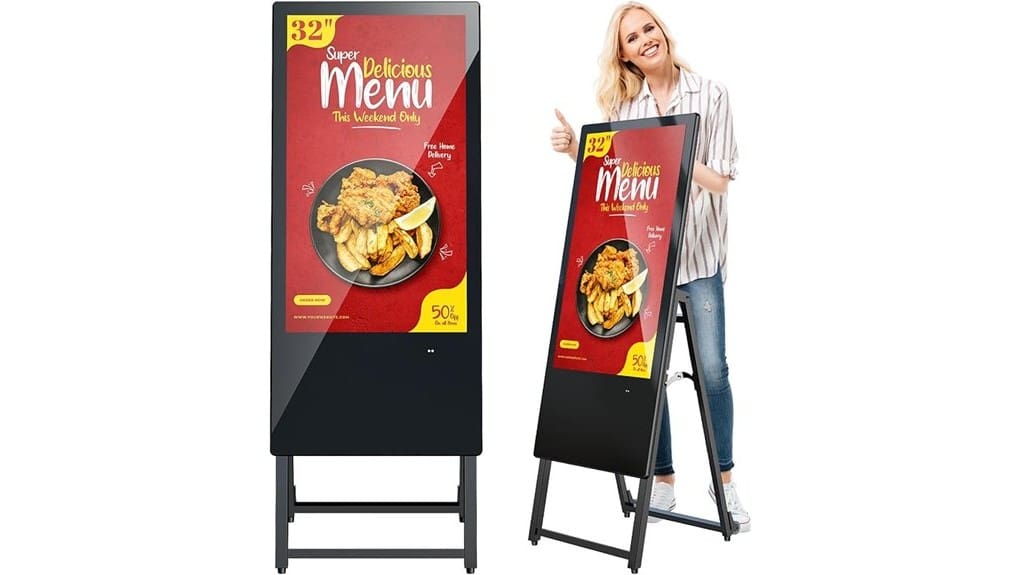
You’ll find the MWE 32″ digital signage is a portable, Full HD IPS display that trades pro-level blacks and extensive ports for easy setup, reliable playback, and built-in Android CMS for remote updates. It’s great for pop-ups, small retailers, and menus thanks to timed power, Wi‑Fi or USB playback, and a foldable wheeled design, though it’s heavy and needs two people to move. It’s a solid value with a three-year warranty—keep going to get specifics on performance and use cases.
Some Key Takeaways
- 32″ FHD IPS panel delivers wide 178° viewing angles and solid color accuracy for consistent signage across crowds.
- Built‑in Android kiosk and remote CMS support USB/HDMI playback and Wi‑Fi updates for easy content management.
- Foldable, wheeled design makes the 47.4 lb unit portable for pop‑ups and events, though two people are recommended for moves.
- Reliable 24/7 playback with timed power schedules and minimal stutter, though Wi‑Fi can lag in dense networks.
- Three‑year warranty and remote support improve deployment confidence, but ports and on‑site repair options are limited.
What the MWE 32 Inch Digital Signage Offers: Key Specs and Standout Features
While the 32-inch MWE Digital Signage looks like a standard display, it packs features that make it a stronger option for retail and hospitality than many entry-level panels. You get a 32″ FHD IPS panel with 178° viewing, built-in Android kiosk and CMS for remote updates, plus USB/HDMI playback and Wi‑Fi. Foldable, wheeled design turns it into a portable kiosk you can reposition easily. Timed power settings and 24/7 design suggest solid energy efficiency compared with bulky alternatives. Two USB ports, auto-loop, and a three-year warranty round out a practical, innovation-minded package for dynamic venues. Brighten your message using backlit letter boards to complement digital displays in mixed-media signage setups.
How It Performs Day-to-Day: Display Quality, Playback, and Connectivity Tests
Because you’ll use this display constantly in public spaces, we put the MWE 32″ through everyday playback and connectivity checks to see how it holds up. You’ll notice the IPS panel delivers wide viewing angles and solid color accuracy for FHD signage; blacks aren’t reference-level, but images stay consistent across crowds. Playback reliability was strong: USB auto-loop and HDMI sources ran without stutter, and timed on/off kept schedules precise. WiFi updates were generally stable, though dense networks introduced occasional lag compared with wired. Overall, you get dependable daily performance that edges past basic players while staying practical for modern venues. These displays pair well with weatherproof lettering for outdoor message signs to maintain legibility in all conditions.
Setup, Portability, and Remote Content Management in Real Environments
Having seen how the MWE handles everyday playback and connectivity, you’ll next want to judge how easy it is to get running, move around, and keep content fresh from afar. Setup is straightforward: plug-and-play USB or WiFi CMS gets you live quickly. The foldable design and built-in wheels beat fixed kiosks for pop-ups and events, though its 47.4 lb weight still needs two people for safe moves. Mounting options are limited compared with modular pro signage, but wall and floor placements work. Remote management is robust—real-time syncing and scheduled updates—while battery longevity refers only to the C cell for remote control. The display pairs well with rotating sign stands designed for eye-catching, portable messaging.
Who Should Buy It: Best Use Cases, Environments, and Cost Justification
If you need a portable, easy-to-manage display for frequent promotions or temporary setups, the MWE 32-inch is a smart pick — it delivers FHD clarity, 24/7 reliability, and remote CMS control in a moveable package. You’ll find it ideal if you’re a small business updating menus, a pop-up retailer rotating offers, or event planners staging modular signage. Compared to static posters or bulky pro displays, it balances cost, mobility, and connectivity. It’s innovative without overkill: plug-and-play USB, WiFi updates, and wheels let you justify the spend when you need flexible, repeatable engagement across venues and campaigns. Consider it especially useful for point-of-sale environments where eye-catching POS signs help drive customer engagement.
Warranty, Support, and Final Verdict: Pros, Cons, and Purchasing Recommendation
While the 3-year warranty and online support give you solid protection against defects, you should weigh that reassurance against the product’s niche fit and your service expectations. The warranty terms cover quality defects, offering a clear safety net for continuous 24/7 deployment. Support responsiveness is handled by a professional technical team via online channels; response times are reasonable but may not replace on-site service for mission-critical installs. Pros: robust warranty, portable design, CMS and remote updates. Cons: limited ports, no immediate on-site repair. Recommendation: buy if you prioritize innovative, remote-manageable signage and low upfront risk. Consider also how well the display aligns with your overall conference room signage needs and branding.
Some Questions Answered
Does It Support Touchscreen Interaction or Pen Input?
No — it doesn’t offer multi touch capability or active pen support. You’ll get a reliable FHD IPS display with plug‑and‑play playback, remote CMS and 24/7 operation, but interactivity is limited to USB/HDMI inputs and remote management. Compared to interactive touch displays, this unit favors passive digital signage and portability over touch innovation. If you need multi touch capability or active pen support, you should consider purpose-built interactive panels instead.
Can It Display 4K Content Scaled From HDMI Sources?
No — it won’t natively display true 4K; the 32″ FHD panel will downscale 4K HDMI sources to 1920×1080. You’ll get 4K scaling handled by the display’s electronics, not full-resolution detail. Compared with true 4K panels, image sharpness and future-proofing are lower, though HDMI passthrough and USB playback keep workflows flexible. If you want genuine 4K fidelity, you’ll need a native 4K screen or external scaler.
Is There Built-In Bluetooth for Audio or Peripherals?
No — it doesn’t list built-in Bluetooth connectivity for audio or peripheral pairing. You’ll need wired USB or HDMI audio, or add an external Bluetooth transmitter/receiver. Compared to modern kiosks with native Bluetooth, this model’s connectivity is more conservative but reliable for 24/7 signage. If you want seamless peripheral pairing or wireless audio, pick a display with explicit Bluetooth support or plan to integrate a compact Bluetooth adapter for innovative setups.
Can Multiple Units Sync Content Playback Locally Without Internet?
Yes — you can achieve local sync and offline scheduling across units. You’ll rely on the built-in Android kiosk and USB/HDMI plug‑and‑play or WiFi LAN to distribute playlists; when internet’s absent, devices will use scheduled, auto-loop playback and USB updates to stay synchronized. Compared to cloud-only systems, this offers resilient, low-latency control for innovative deployments, though it’s less flexible for instant remote edits without reconnecting to your CMS.
Are Mounting Brackets or VESA Adapters Included?
No — mounting brackets or VESA adapters aren’t included, so you’ll need to source a wall mount or adapter options separately. You’ll appreciate that the display’s foldable, portable design still supports VESA-style mounting, giving you flexible installation compared with rigid kiosks. If you want a sleek, permanent setup, pick a low-profile wall mount; for hybrid use, choose an adapter that preserves mobility while offering secure, professional mounting.