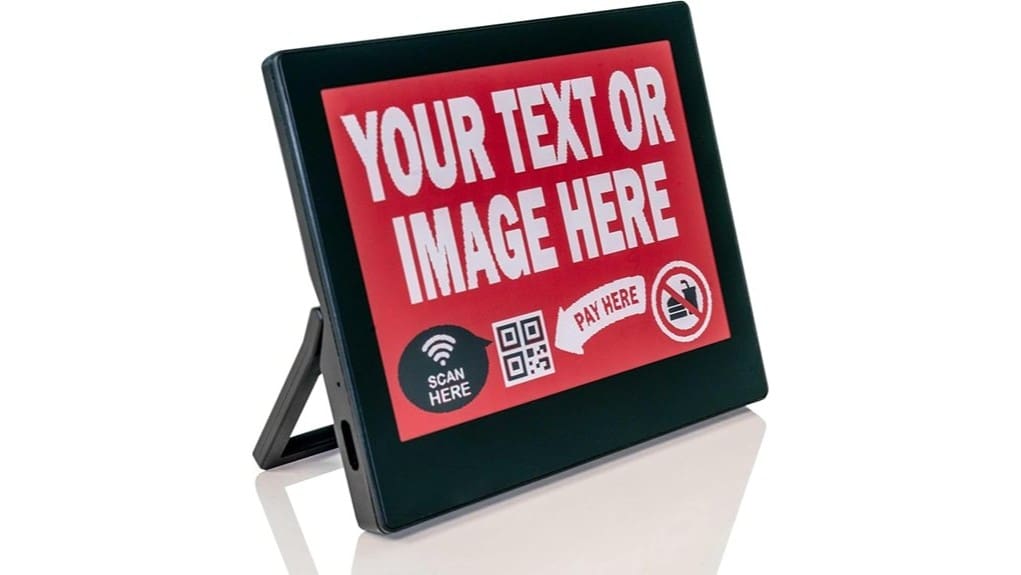
The Santek EZ Sign 4.2″ is a no-frills e-paper display that’s built for simple, low-maintenance signage—great if you want paper-like readability and near-zero standby power. You’ll update content via a Windows-only USB-C app, and the screen holds images without power but refreshes slowly, so it’s not for motion or frequent changes. Setup and templates are straightforward, and the compact stand fits desks nicely; keep going to learn more about limitations and alternatives.
Some Key Takeaways
- Excellent paper-like readability with matte, anti-glare e-paper and high contrast, ideal for static signage in varied lighting.
- Bi-stable display holds content without power; near-zero idle draw maximizes battery life between updates.
- Slow refresh (~20–25s) and USB-C transfer via Windows-only EZ Sign App make it unsuitable for motion or rapid updates.
- Workflow supports 300×400 canvas, five saved templates, and simple image/text import for quick, occasional content swaps.
- Best for users who value low-maintenance, offline signage; consider cloud-enabled alternatives if multi-device or cross-OS updates are needed.
What the Santek EZ Sign 4.2 Actually Is and Who It’s For
While it looks simple, the Santek EZ Sign 4.2 is a purpose-built, low-power e-paper message display that’s ideal if you need a clear, always-on sign without constant charging. You’ll find it centers on essential core functions: persistent, paper-like clarity and easy content updates via the Windows app and USB-C. It’s aimed at pragmatic innovators — designers, office managers, and makers — who value subtle, reliable signage. Target audiences appreciate low-maintenance hardware that integrates into workflows without fuss. You won’t get flashy extras, but you will get a focused tool that prioritizes longevity, legibility, and straightforward operation. It’s especially useful for those who use a sign to share a message with minimal upkeep, such as changeable letter boards in office or retail settings.
Display, Power, and Update Behavior: Real-World Performance
Because the 4.2″ AMEPD e-paper pairs high contrast with a true paper-like matte finish, you’ll get crisp, glare-free text and images that stay readable from normal viewing angles without any blue light distraction. In use, the panel’s clarity and anti-glare surface minimize ambient light interference and preserve legibility across lighting conditions. Updates are deliberate: the slow refresh (~20–25 seconds) and bi-stable memory mean the display draws power only when changing content, delivering excellent low power operation and long battery life. Expect no motion or video; assess readability impact for rapid-changing signage versus static notifications. The sign is intended for outdoor messaging and works well with Durable Waterproof sign letters for lasting visibility.
Content Creation and Workflow With the Santek EZ Sign App
When you prepare messages for the Santek EZ Sign, you’ll work in the Windows-only EZ Sign App and transfer content via USB-C—updates only need the cable during transfer, after which the display holds the image wirelessly. You’ll find the USB workflow simple: import images or type text, preview on a 300×400 canvas, then send. Template management is basic but effective—save up to five messages, edit placeholders, and switch from the device. The app’s language support and predictable update time keep workflows efficient. It won’t replace full design suites, but it’s optimized for rapid, low-power signage iteration. These swapable sign boards make it easy to update messaging on the fly with minimal hardware changes and quick content swaps using quick-change sign boards.
Design, Mounting, and Day-to-Day Usability
Although compact, the Santek EZ Sign’s 4.2″ unit feels deliberate in its design. You’ll notice minimalist aesthetics immediately: clean lines, matte finish, and an anti-glare e-paper face that reads like paper. The built-in stand makes desktop placement effortless; you won’t need extra hardware. Mounting options are limited compared with the magnetic 2.9″ model, but the stand suits most desks and shelves. Day-to-day use is straightforward — updates via USB-C are occasional, the display’s static clarity conserves power, and tactile controls let you toggle saved messages without digging into the app. Overall, practical and refined for innovators. Consider pairing it with complementary products for letter board styling to create cohesive indoor displays.
Is It Worth Buying? Price, Alternatives, and Final Recommendation
If you’re weighing value, the Santek EZ Sign 4.2″ earns points for its paper-like readability, near-zero idle power draw, and simple offline workflow — but its appeal hinges on whether the feature set matches your needs and budget. You’ll appreciate battery longevity and near-zero maintenance if you want low-friction signs. Price-wise it’s reasonable for a niche e-paper device, though limited Windows-only app and USB-C update workflow may deter some. Consider alternatives in competing ecosystems if you need cloud updates, multi-device management, or broader OS support. Recommendation: buy if you prioritize simplicity and standby life; otherwise explore cloud-enabled rivals. Our store focuses on wind-resistant bases designed to keep signs standing in adverse conditions.
Some Questions Answered
Does It Support Scheduled Automatic Updates Without Manual USB Connection?
No — it doesn’t support scheduled automatic updates without a manual USB connection. You can’t rely on remote scheduling or cloud integration to push timed content; updates require a USB-C connection from the Windows-only EZ Sign App. That design favors ultra-low-power, offline operation and long battery life, but limits automation. If you need cloud-based scheduling or remote control, you’ll have to look for a different e-paper solution with built-in network capabilities.
Can I Display Animated GIFS or Video Files?
No — you can’t show animated GIFs or do video playback. The bi-stable e-paper only updates static frames and draws power during each refresh, so it’s built for still images and text. You can store up to five static messages (black, white, red) and toggle between them, but smooth animation or video isn’t supported. If you want motion, you’ll need a different display technology that supports continuous refresh and color video.
Is Bluetooth or Wi‑Fi Built Into the Device?
No — it doesn’t include Bluetooth pairing or other wireless protocols onboard. You’ll connect via USB‑C during updates; the display then holds content without constant power. That means no Wi‑Fi or Bluetooth for live changes, which preserves battery life and simplicity. If you want real-time remote control or networked signage, this device won’t provide it; it’s optimized for ultra‑low‑power, manually updated message displays rather than continuous connectivity.
Are Replacement Batteries or Internal Battery Specs Available?
No detailed internal battery specs are published, and replacement availability is limited. You’ll get excellent battery lifespan because the display draws power only during updates, but the manufacturer doesn’t list capacity or chemistry. That means replacement availability likely requires contacting support or servicing the unit rather than user-swappable cells. If innovation and long-term maintainability matter, you’ll want to confirm service options before committing.
Does It Come With a Warranty and Customer Support Contact?
Yes — it includes a warranty; the warranty duration typically covers one year, though you should confirm at purchase. You’ll get customer support through standard support channels: email and website forms, with occasional phone or chat availability depending on region. You’ll want to keep proof of purchase and serial info for claims. This setup feels practical and forward-looking, but verify exact terms and response times before you buy.


