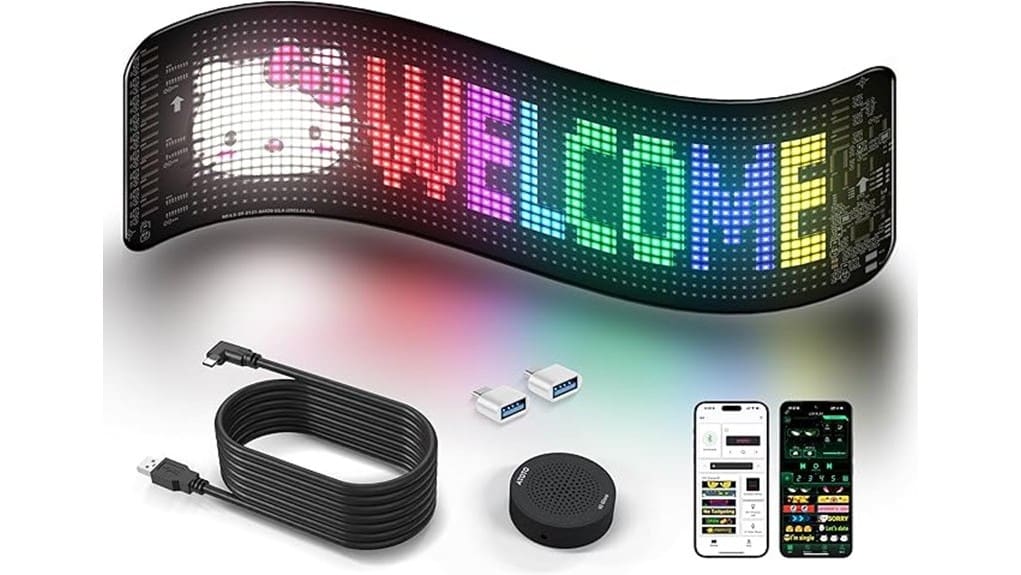
You’ll get a compact, low‑power RGB panel that scrolls text, emojis, and simple GIFs for storefronts, counters, and events. It’s programmable via Bluetooth, voice, or USB and runs on a 5V/3A supply with a long USB cable for flexible placement. Pick a panel size and pixel density that match viewing distance; choose IP66 for outdoor use. Set up is quick with app controls and firmware updates, and below you’ll find practical setup, performance, and buying guidance.
Some Key Takeaways
- Look for pixel matrix and panel size matching viewing distance; higher density shows logos and GIFs more clearly.
- Verify true power input (5V/3A) and included long USB cable for reliable, flexible placement.
- Prefer IP66-rated, heat-resistant builds for outdoor durability and extended real-world use.
- Check mounting options (adhesive, screws, brackets) to balance stability, service access, and ventilation.
- Evaluate control methods (Bluetooth app, voice, USB) plus firmware updates and battery power requirements.
Why Choose a Scrolling Advertising LED Sign (Who Benefits Most)
Because they combine programmable visuals, low power draw, and versatile mounting, scrolling advertising LED signs suit anyone who needs eye-catching, dynamic messaging without bulky hardware. You’ll deploy compact, programmable displays to drive promotions, queue info, or mood lighting with precise control via Bluetooth APP, voice, or USB. Small businesses get a high-impact, low-energy solution for storefronts and counters; event promoters gain portable, mountable signage for fast setup and variable messaging. You’ll appreciate the flexible panel, adhesive mounting, and long USB cable that let you position content where it converts, iterating visuals quickly to match audience response. These displays pair especially well with complementary decor like backlit letter boards to brighten messaging and enhance visual appeal.
What to Look For: Must-Have Features and Specs (Size, Resolution, IP Rating, Power)
Now that you know who benefits most, focus on the specs that determine real-world performance: pick a panel size and pixel matrix that match your viewing distance and message complexity, confirm IP66 for outdoor use and high-temp tolerance for hot environments, and verify power requirements and cable length for your mounting location. Choose resolution and pixel density to balance clarity and file size; higher density lets you show detailed logos and GIFs. Check true power input (5V/3A) and included 16.4 ft cable against your outlet. Assess mounting options—adhesive, screws, or brackets—for stability, service access, and thermal ventilation. For signs expected to last in sun-exposed areas, consider durable UV-resistant materials to extend longevity.
Hands-On Review: Performance, Controls, and Real-World Use Cases
When you power the ATOTOZONE scrolling LED sign and pair it with the SS App or voice control, its responsiveness and clarity become obvious: the 20×96 RGB matrix renders text, emojis, and simple GIFs crisply at typical viewing distances, and the app’s presets plus live AI voice transcription let you update messages in seconds. You’ll notice low latency controls and steady frame timing; brightness scales smoothly for night visibility testing and daytime legibility. Hardware feels robust—IP66 rating and heat-resistant materials support real world durability. Use cases: in-car promos, countertop menus, pop-up events, and ambient decor where portability and reliable performance matter. Protective cases can help keep signs readable and safe in harsh conditions, offering added impact protection for mobile and outdoor use.
Setup, Customization, and Voice/Bluetooth Control Tips
Getting the ATOTOZONE sign up and running is quick: mount it with the 3M backing, plug the 16.4 ft USB cable into a 5V/3A supply, and power on the panel. You’ll pair via Bluetooth using the SS App, configure fonts, colors, brightness, timing, and load ready-made GIFs. Use Voice shortcuts to speak messages and stream text in real time; map phrases to quick commands. Apply Firmware tips: check for updates over USB/Bluetooth and back up profiles. Employ Battery hacks if running off portable packs—use 3A outputs and power banks with pass-through. Review Privacy settings in-app to limit remote access. For longer-lasting outdoor displays consider fade-resistant materials and sign letter durability when choosing components.
Pros, Cons, and Who Should (or Shouldn’t) Buy This Sign
Although compact and low‑power, the ATOTOZONE scrolling LED sign packs several strengths and a few tradeoffs you’ll want to weigh before buying: it offers full‑color programmable text and animations with real‑time AI voice input and a feature‑rich Bluetooth app, plus durable IP66 construction and flexible mounting for indoor/outdoor use; on the flip side, its narrow 20×96 matrix limits high‑resolution graphics and detailed fonts, and reliable portable use requires a 3A power source or high‑capacity power bank. You’ll get strong social engagement, low energy efficiency impact, and versatile placement. Buy if you need dynamic messaging; skip if you need fine graphics. The product also fits well with businesses and creators who want to Brighten Your Message With LED letter lights for events and displays.
Some Questions Answered
Is There a Warranty Beyond Amazon’s 30-Day Return Window?
No — there’s no stated manufacturer warranty beyond Amazon’s 30-day return window in the provided info. You’ll want to contact Shenzhen Yufengzhixing Electronics Tech Co Ltd or ATOTOZONE to ask about a manufacturer warranty and any extended protection plans. If you need longer coverage, request proof of warranty terms or look for third-party extended protection options that cover electronics, water ingress, and thermal stress for your flexible LED panel.
Can Multiple Signs Sync Together for Coordinated Displays?
Yes — you can sync multiple signs for coordinated displays. You’ll use the SS App’s multi display synchronization to link panels, push content, and manage real time scheduling so messages and animations play in lockstep. Setup is Bluetooth-based; the app handles grouping, timing offsets, and simultaneous playback. That lets you create distributed, synchronized visuals across cars, counters, or installations with low-latency control and centralized scheduling.
Does the Sign Support Third-Party Fonts or Unicode Characters?
No — it doesn’t fully support arbitrary third-party fonts or broad Unicode sets. You can upload custom glyphs via the SS App as images or mapped patterns, and limited font embedding is available for Latin characters and preset symbols. If you need full Unicode or complex scripts, you’ll have to rasterize text into custom glyphs before sending. This practical workflow lets you innovate while respecting the sign’s rendering limits.
Is the USB Power Cable Replaceable With a Longer One?
Yes — you can use a longer cable: the sign accepts standard 5V/3A USB power, so you’ll replace the 16.4 ft USB cable with a compatible longer cable or USB power extension rated for 5V/3A. Choose a high-quality, low-resistance cable or powered USB extension to avoid voltage drop. You’ll keep stable brightness and functionality; avoid cheap thin cables that can cause flicker or underpower the flexible LED panel.
Are Replacement 3M Adhesives and Mounting Accessories Available?
Yes — replacement 3M adhesive options and mounting templates are available for the unit. You can source high-strength 3M double-sided tape or automotive-grade adhesive pads to match the IP66, temperature-resistant housing; third-party mounting templates and low-profile brackets let you align and secure the 20×96 RGB panel precisely. You’ll want silicone-safe cleaners and position guides when replacing adhesives to preserve the panel’s finish and attachment strength.


