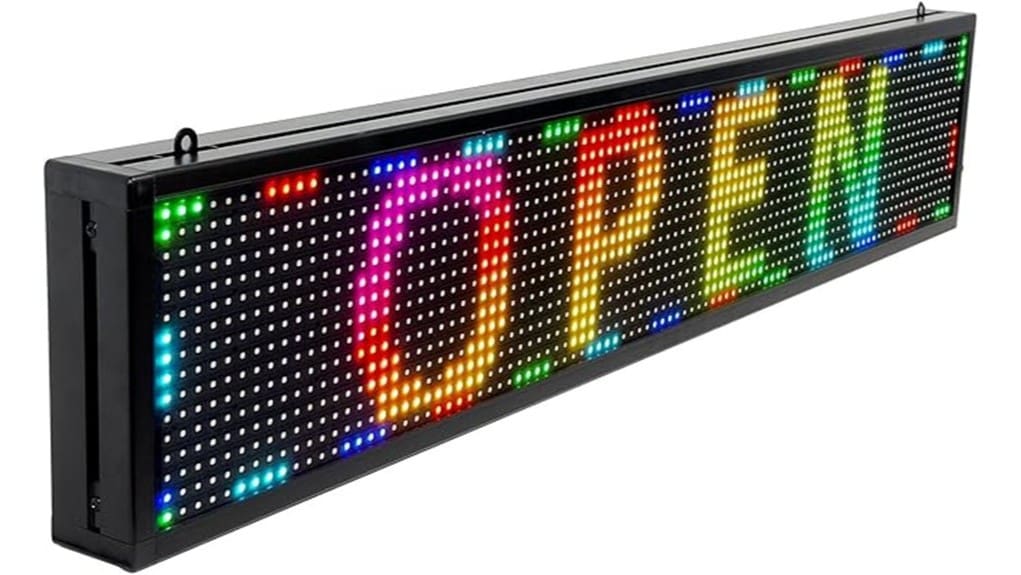
You’ll get a compact P10 SMD 96×16 LED panel (39×8″) in a lightweight aluminum frame with USB and Wi‑Fi control, integrated FCC/UL 5V power, and mounting brackets. Setup’s straightforward: mount, power, then pair via AP mode or plug USB into Windows/Android. Brightness is strong for indoor/sheltered outdoor use, color is punchy but detail is coarse and fine text blurs at distance. It’s great for tickers; keep going to see setup tips and workflow notes.
Some Key Takeaways
- Compact P10 SMD panel (96×16) suits storefronts and bars but lacks fine-detail resolution for close-range reading.
- Dual control via Wi‑Fi or USB enables mobile app pairing and Windows/Android clients; macOS unsupported.
- Integrated FCC/UL 5V power module and aluminum housing make it lightweight and easy to mount with brackets.
- Bright, uniform colors and smooth moderate-speed scrolling; fastest scrolls or dense fonts can show artifacts.
- Recommended for small businesses needing deployable ticker signage; consider higher-resolution or Mac-compatible alternatives if needed.
What You Get in the Box and Key Specs (Size, Resolution, P10, Weight)
What’s in the box and how big is it? You get the KHUSINA CBY-HB-003 (39″ x 8″ display area; 40 x 8 x 0.4″ housing), P10 SMD full-color matrix (96 x 16 resolution), and a compact 8.98 lb aluminum frame. The unboxing experience is efficient: protective packaging materials, foam supports, and a clear accessory checklist. Included: integrated 5V FCC/UL power module, mounting brackets, control cable, and quick guide. Evaluate mounting options for indoor/outdoor placement and verify weight/load. This package blends precise specs with practical hardware, targeting innovators who prioritize deployable, high-density signage. Brighten your message with backlit letter boards as a complementary display option that pairs well with programmable LED signs.
How to Set Up the KHUSINA CBY-HB-003 Using WiFi or USB
Now that you’ve seen what’s in the box and confirmed the physical specs, setting up the KHUSINA CBY-HB-003 is straightforward whether you choose WiFi or USB. Unpack, mount, connect power, then decide: Wi‑Fi pairing gives wireless flexibility; follow the included video to put the sign into AP mode, connect your phone or PC to the sign’s hotspot, open the control app, and push your SSID and password. For wired control, use the supplied USB cable and the Windows or Android client. If connection fails, consult USB troubleshooting steps, update drivers, and retry the app. The process is fast, reliable, and professional. Designers of programmable signs should craft eye-catching messages that match the sign’s size and viewing distance.
Live Performance: Brightness, Readability, Color and Scrolling Behavior
When you power the KHUSINA CBY-HB-003 and load messages, its P10 SMD full‑color array delivers strong, usable brightness for most indoor and many outdoor settings without needing high-gain optics. You’ll find brightness uniformity across the 39×8″ panel is good; calibration minimizes banding though peak luminance isn’t theatrical. Color accuracy is respectable for commercial messaging; reds and greens pop, subtle gradients compress. Viewing angles remain wide enough for storefront and bar placements, but fine detail fades at extreme obliquity. Scrolling behavior is smooth at moderate speeds; you’ll only notice motion artifacts at fastest scroll rates or dense pixel fonts. These displays pair well with durable UV-resistant letter sets to create lasting, weather-resistant signage.
Compatibility, Software Control, and Common Usage Workflows
Brightness and scrolling behavior matter only if you can actually get content onto the KHUSINA CBY-HB-003 reliably, and that’s where compatibility and control come in. You’ll find a Windows/Android/iPhone software stack and USB/WiFi links; macOS is unsupported. Evaluate the App ecosystem for update cadence and plugin availability. Set User permissions to restrict editing or scheduling across teams. Use Cloud backup to preserve message libraries and timestamps. For automation, test API integration options or SDKs; rate limits and auth matter. Typical workflows: design on PC, sync via WiFi, schedule playlists, and monitor status remotely for iterative refinement. Consider common use cases and template sets from the engaging ideas catalog to speed message creation.
Who Should Buy This Sign : Strengths, Limitations, and Final Recommendation
Although the CBY-HB-003 excels as a compact, programmable P10 LED panel, you should buy it only if your priority is a durable, full-color sign with reliable USB/WiFi control for small to medium indoor or sheltered outdoor placements. You’ll appreciate its P10 resolution, aluminum housing, and cross-platform control (Windows/Android/iPhone) for storefronts, bars, and inventory tickers. Strengths: lightweight, video-capable SMD LEDs, integrated FCC/UL power supply, easy setup. Limitations: coarse 96×16 dot map, limited Mac support, not ideal for long-range legibility. Target customers: small businesses and innovators. Consider purchase alternatives if you need higher resolution or Mac-native software. Bright Letter Signs offers a range of illuminated sign letters that complement programmable LED panels.
Some Questions Answered
Does the Sign Support Scheduled Daily On/Off Timers?
Yes — you can schedule daily on/off times. You’ll use the built-in scheduler in the control software (Windows/Android/iPhone) to set recurring power windows, and it supports energy saving modes to cut display runtime. The implementation is technical and reliable: firmware-driven timers with WiFi sync and USB backup for offline schedules. It’s ideal if you’re optimizing signage uptime, reducing power usage, and automating business hours without manual intervention.
Can I Create and Display Animated GIFS or MP4 Videos?
Yes — you can display animated GIFs and perform video playback. You’ll use the supplied control software (Windows/Android/iPhone) to convert and upload media; the P10 96×16 resolution and SMD full-color panel limit detail and frame rate, so expect pixelated, low‑fps results. For best outcomes, optimize files to the display’s 96×16 canvas and short durations. You’ll appreciate reliable USB/WiFi transfer and integrated 5V power for continuous playback.
Is the Unit Weatherproof for Permanent Outdoor Mounting?
Yes — you can mount it outdoors, but don’t assume permanent exposure without precautions. The enclosure offers weather sealing and UV protection for typical storefront or seasonal installations, and the integrated FCC/UL listed 5V power supply accepts 85–240V. For long-term, permanent mounting verify gasket integrity, seal cable entries, and provide sheltered orientation to limit direct rain and sun. Follow the included manual and test after installation.
Can Multiple Signs Be Synchronized to Show the Same Message?
Yes — you can sync multiple units to display identical content. You’ll use network syncing via WiFi and the controller’s multicast control features to push the same message simultaneously. The Windows/Android/iPhone software supports group addressing; configure each sign’s IP/group ID, then broadcast updates. It’s reliable for coordinated branding, though test latency and range in your environment and make certain firmware/software versions match for consistent timing and behavior.
What Warranty Options Exist Beyond the 30-Day Return Policy?
You can’t get manufacturer extended warranty details beyond Amazon’s 30-day return; you’ll need to buy third-party extended warranty or service plans. Evaluate options from electronics insurers or retailers offering multi-year coverage, accidental damage, and on-site repair. Check service plans’ response times, parts availability, and claim limits; confirm compatibility with the sign’s FCC/UL power unit and P10 SMD modules before purchasing to guarantee adequate support and innovation-focused uptime.


