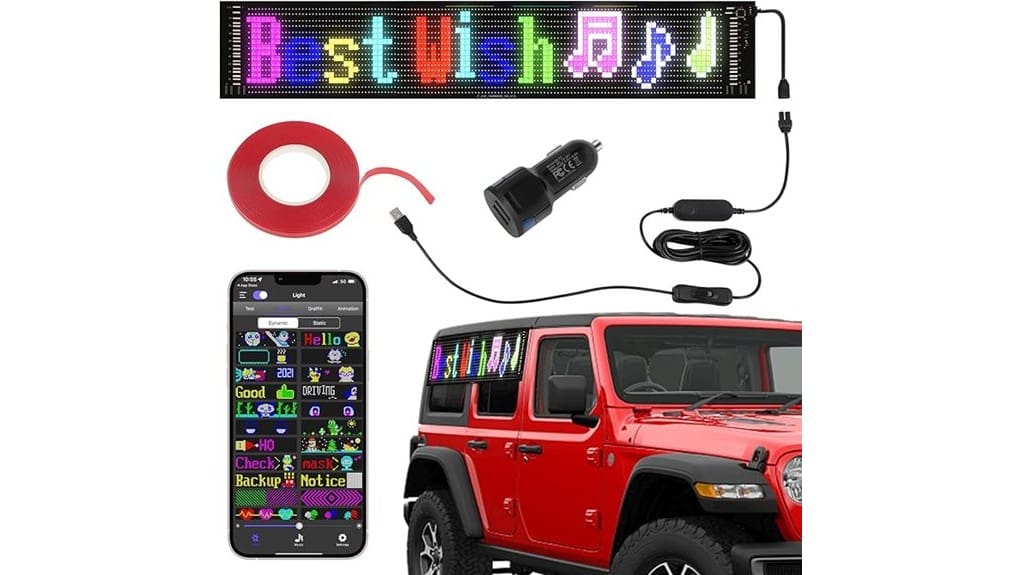

The 27″ x 5″ Scrolling LED SignMatrix panel gives you a thin, flexible RGB display that’s easy to mount in tight or curved spaces and holds up to outdoor use with IP66 sealing. You’ll get precise 256-color control, app-driven animations via CoolLED1248, and adjustable brightness with modest USB power draw. It’s lightweight, rollable, and suited for storefronts, vehicles, or pop-ups where space and customization matter. Keep going and you’ll see installation tips, performance specifics, and real-world use cases.
Some Key Takeaways
- Compact, rollable 27″ x 5″ flexible LED panel fits tight spaces and curved installations while remaining lightweight and thin.
- Full-color RGB output with a 256-color palette delivers clear graphics, solid gradients, and adjustable brightness for day/night use.
- Controlled via CoolLED1248 Bluetooth app for pixel-level editing, custom animations, and timing controls with reliable pairing tips.
- IP66-sealed construction, resilient flex circuitry, and protective encapsulation provide strong weather resistance for outdoor use.
- Multiple mounting options (included 3M tape, adhesive, hanging) and low-power USB supply make installation and portability simple.
Is the 27″ X 5″ Scrolling LED Signmatrix Panel Right for Your Business?
If you need a compact, high-impact display that’s easy to install and customize, the 27″ x 5″ Scrolling LED SignMatrix Panel is worth considering. You’ll evaluate fit by mapping objectives to capabilities: mobile app control and programmable displays let you optimize customer engagement with targeted messages and seasonal promotions. The thin, flexible form addresses space constraints where conventional signs won’t fit. You’ll maintain brand consistency via precise color control and repeatable templates. For innovators, it’s a technical, low-power tool that lets you iterate messaging rapidly, deploy DIY content, and measure visual impact without major infrastructure changes. Many customers pair these panels with backlit letter boards to create layered signage that enhances visibility and style.
What the Hardware Is: Size, Flexibility, Durability, and IP66 Waterproofing
Because the SignMatrix panel combines a 27″ x 5″ footprint with a remarkably thin, flexible PCB construction, you get a display that’s easy to place in tight spaces and conform to curved surfaces without bulky housing. You’ll appreciate how the lightweight, rollable board reduces install labor and expands mounting options — adhesive, tape, or hanging — for vehicles, windows, and modular fixtures. The sealed assembly meets IP66 waterproofing standards, so water jets and heavy spray won’t degrade operation. Durability stems from resilient flex circuitry and protective encapsulation; expect robust weather resistance and reliable mechanical performance in demanding, innovative deployments. These weather-resistant features make the SignMatrix ideal for protecting outdoor messages with weather shields.
How the Display Performs: Color, Brightness, Refresh, and Power Use
While the SignMatrix delivers vivid full-color output across its 27″ x 5″ canvas, you’ll notice its 256-color palette and RGB LED density produce clear, high-contrast graphics even at a distance. You’ll appreciate solid color fidelity for logos and gradients; hues stay consistent across viewing angles with minimal banding. Brightness is high enough for storefront and vehicle use without washout; you can throttle output for night settings. Measured refresh rates reduce flicker on camera and to the eye, though complex animations tax the controller. Power draw remains low via USB supply, balancing luminosity and runtime efficiently. The display is ideal for businesses and creators who use a sign to share a message, offering adaptable visibility for different environments and purposes illuminated sign letters.
Using and Customizing It: CoolLED1248 App, Bluetooth Control, and DIY Content Setup
Get started by pairing the SignMatrix with the CoolLED1248 app over Bluetooth, then you’ll have full control to program text, patterns, and custom graphics. You’ll navigate a compact interface to set brightness, speed, and display mode, import DIY content, and sequence frames into Custom animations. The connection is generally reliable; if pairing fails, follow Bluetooth troubleshooting: restart the app, reset the panel, confirm permissions, and keep firmware current. Advanced users will appreciate pixel-level editing and timing controls for precise effects. Overall the app balances simplicity with technical depth, letting you prototype inventive displays quickly and iteratively. The product suite also includes accessories and guides for designing eye-catching messages for programmable signs, which can help improve your sign’s effectiveness when used with the SignMatrix designing eye-catching messages.
Real-World Fit: Installation Options, Use Cases, Price/Value, and Final Buy Recommendation
After you’ve paired and programmed the panel with the CoolLED1248 app, consider how it will actually mount and perform in your space—its flexible, rollable design and IP66 rating give you options that rigid signs don’t. You’ll deploy it with included 3M tape or drip adhesive, and compatible installation accessories expand tool-free mounting on car or store glass. Use cases span mobile advertising, storefront promos, event accent lighting, and pop-up venues. Performance is bright, low-power, and programmable via Bluetooth. At its price point the panel delivers high utility and low overhead; buy it if you prioritize portability, customization, and strong resale value. For long-term outdoor use, pair it with weather-resistant letters and other supplies designed for durability.
Some Questions Answered
Does It Support Scheduled On/Off Timers or Automation?
Yes — you can schedule on/off timers and automate displays via the Bluetooth app. You’ll manage battery management settings, set timed power cycles, and integrate motion activation for wake-on-demand. The system also supports basic energy harvesting strategies to extend runtime, and it’s designed for future voice control integration through app APIs. You’ll get precise, programmable automation with technical options for power optimization and responsive activation.
Can Multiple Panels Sync Together for Extended Displays?
Yes — you can daisy chain multiple panels to create extended displays. You’ll link them via their USB/data ports and the app handles color synchronization so animations and palettes stay consistent across panels. Performance is solid for short runs; latency stays low if you keep cable lengths reasonable. For large installations, test timing and brightness across units and plan power distribution to avoid voltage drop and uneven color output.
What Warranty and Customer Support Options Are Available?
You get a limited warranty covering manufacturing defects for a defined period, and phone support for setup, troubleshooting, and firmware questions. You’ll also access email/ticket support and online documentation; returns follow warranty terms. The warranty excludes physical damage and misuse, so you’ll want to document installations. Overall, support is pragmatic and technically focused—responsive phone support for urgent issues, with warranty scope emphasizing repair or replacement rather than cosmetic fixes.
Is the Panel Airline-Safe or Allowed in Checked Baggage?
Yes — you can usually pack the panel in checked baggage, but you should verify airline restrictions and baggage sizing limits first. The flexible, lightweight board and USB power reduce risk, yet lithium batteries (if included) and waterproof coatings can trigger rules. You’ll want protective packaging to prevent bending, and confirm battery regulations or declare electronics at check-in. For carry-on, confirm dimensional limits and the airline’s electronic device policies.
Are There Any Compatible Third-Party Apps or APIS?
Yes — you can use third party integration via the CoolLED1248 app and community tools, but there’s no official public developer API beyond the mobile app’s Bluetooth protocol. You’ll have to reverse-engineer or use unofficial libraries to automate content, brightness, speed, or patterns. If you’re comfortable with BLE hacking, you’ll integrate programmatically; otherwise stick with the app. Expect hobbyist support rather than enterprise-grade API documentation or SDK.