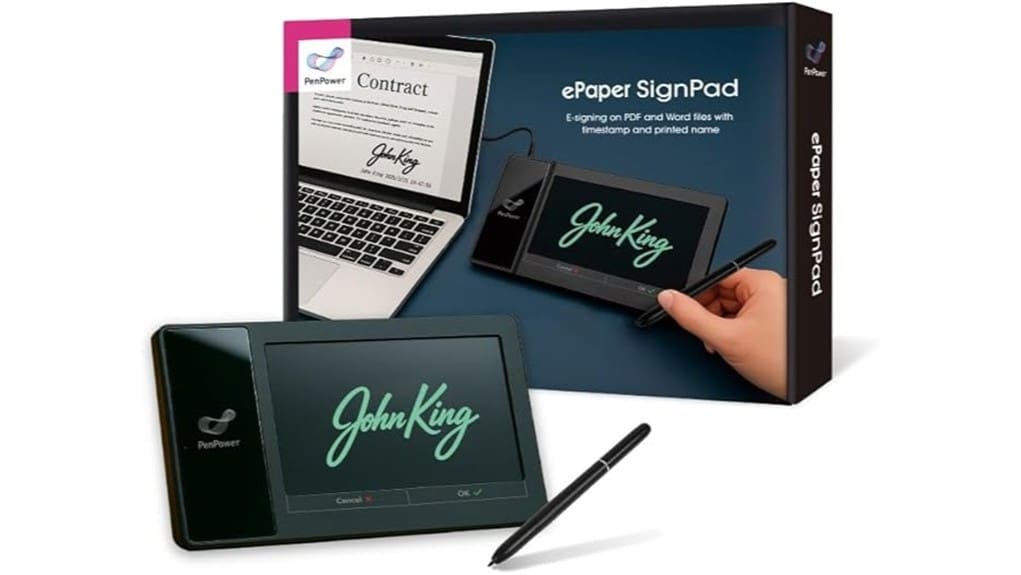
You’ll get a compact, SDK-ready signing tablet that captures legally useful e-signatures, biometric stroke data (pressure, X/Y, timestamps), and embeds images into PDFs, Word, Excel, and common image formats. Setup is quick on Windows, macOS, Android, or iOS and signing is one-tap with audit logs and cloud sync. It suits sales, insurance, field ops, and kiosks needing traceable approvals. Keep going and you’ll find integration, security, and troubleshooting details next.
Some Key Takeaways
- Captures legally useful, timestamped signatures on PDFs, Word/Excel, and common image formats with a single tap.
- Integrates via SDK to embed signatures, return biometric stroke data, and maintain auditable traceability without workflow changes.
- Fast onboarding on Windows, macOS, Android, and iOS with one-tap signing and optional cloud sync for storage.
- Records per-stroke biometrics (pressure, X/Y, timestamps) for verification while exposing metadata, not raw templates.
- Best for sales, legal, insurance, and field operations needing secure, portable, and programmable e-signing.
What the Penpower ePaper Signpad Does and Who Should Use It
The Penpower ePaper Signpad streamlines electronic signing and document handling, letting you capture instant, legally useful signatures on PDFs, Word/Excel files, and common image formats with a single tap. You’ll find handheld convenience shifts signing from desks to wherever decisions occur, reducing paper cycles and delays. The device pairs with SDK tools so you can embed signatures, retrieve biometric metrics, and enforce traceability without altering workflows. It fits teams needing secure, auditable sign-offs—sales, legal, insurance, and operations—where mobility and integration matter. You’ll appreciate signature customization and programmatic data access for verification and automated processing. It is an excellent option for organizations that sell or use sign message organizers to present clear, changeable messages alongside signatures.
Instant E-Signatures: Setup, Signing Workflow, and Supported File Types
Having seen who benefits from the Penpower ePaper Signpad, you’ll want to know how quickly you can get from unboxed device to signed document. You’ll complete fast onboarding via a guided app and SDK examples; setup takes minutes on Windows, macOS, Android, or iOS, ensuring mobile compatibility. The signing workflow is one-tap: load a file, place signature, confirm, and the system timestamps and embeds the signature image. It handles PDF, Word, Excel, JPG, PNG, TIFF and supports batch processing for multiple pages or files. Cloud sync uploads signed documents to your chosen storage or enterprise endpoint. The device is also ideal for users who need to create eye-catching messages on programmable signs.
Security, Traceability, and Biometric Signature Data Explained
Because digital signatures need more than a visual mark to be trustworthy, Penpower combines timestamps, printed names, and biometric capture to create a verifiable audit trail you can rely on. You get biometric verification data—pressure, X/Y coordinates, and time—recorded with each stroke so signature behavior is reproducible and machine-readable. The SDK surfaces that metadata for secure storage and correlation without exposing raw biometric templates. Audit logs timestamp events, link signer identity, and record document versions, supporting dispute resolution and compliance reviews. Overall, the system balances usability and forensic value so you can adopt paperless workflows with measurable assurance. The product line also integrates with workplace message systems for clear, durable displays of signing status and instructions, reinforcing clear signage in shared environments.
Integrations and SDK Features for Developers and Enterprise Systems
While you integrate Penpower into your systems, you’ll find its SDK exposes rich signature metadata—X/Y coordinates, pressure, timestamps—and flexible APIs that let you embed e-signing into web apps, enterprise portals, and native clients without reworking document workflows. You’ll access clear API endpoints for session management, document conversion, and signature retrieval, reducing integration time. Enterprise plugins streamline single-sign-on, audit logging, and storage routing to existing repositories. The SDK supports PDF/Word/Excel image insertion and returns biometric payloads for server-side verification. Documentation is pragmatic, with code samples and error handling guidance, so you can prototype quickly and scale predictably across environments. These features make it straightforward to integrate with products for conversion tracking used by businesses that display messages on signs.
Real-World Use Cases, Performance Notes, and Common Troubleshooting
When you deploy the Penpower ePaper Signpad across real workflows, you’ll quickly see where it speeds approvals and where you should watch performance: it eliminates printing and scanning for quotes, contracts, and insurance forms, supports live collaboration for sketching and sticky-note memos, and delivers detailed signature metadata (coordinates, pressure, timestamps) for auditability, but network latency, document size, and SDK integration choices can affect responsiveness and signature-sync times. You’ll use it for point-of-sale agreements, remote notarization, field sales, and mobile kiosks. Monitor bandwidth, optimize PDF size, update firmware, and validate SDK callbacks; logging solves most sync or rendering issues. Consider using wind-resistant bases when deploying kiosks or freestanding sign displays outdoors to keep your signs standing.
Some Questions Answered
Can Signatures Be Legally Binding Across Different Countries?
Yes — signatures can be legally binding cross border, but it depends on jurisdictional rules and recognition standards in each country. You’ll need robust authentication methods, clear audit trails, and biometric or timestamp evidence to meet local legal thresholds. Evaluate treaty coverage, local e-signature laws, and industry-specific regulations. You should integrate SDK data (coordinates, pressure, time) and compliance checks to maximize cross-border enforceability and reduce legal risk.
Is Offline Signing Supported Without an Internet Connection?
Yes — you can sign offline. You’ll capture signatures locally and use local storage to hold signature images, biometric data (coordinates, pressure, timestamps) and timestamps until you reconnect. This lets you complete documents without internet, preserving traceability and later syncing to enterprise systems via the SDK. You’ll want an integration plan for secure transfer, encryption, and version control so offline signing fits smoothly into your paperless, auditable workflow.
How Long Is Signed Document Data Retained or Archived?
You control retention length via configurable data retention and archival policies; default storage varies by deployment but you can set retention periods and automated archival rules. You’ll retain signed document data as long as your policy requires — from days to years — with archived records including timestamps and biometric metadata for traceability. You’ll also be able to export or purge records programmatically to meet compliance, storage limits, or organizational governance.
Are Signature Pads Compatible With macOS and Linux?
Yes — you can use signature pads with macOS and Linux, though compatibility varies. You’ll pair Bluetooth devices easily for wireless use, but expect occasional driver updates on macOS and manual driver or SDK installation on Linux. Verify SDK support and available APIs for integration. If you need enterprise features (biometric coordinates, timestamps), confirm vendor Linux/macos drivers and update cadence to maintain security and reliable pairing.
What Warranty and Technical Support Options Are Available?
You get a limited warranty covering defects for a defined period and access to technical resources; for critical needs you can purchase premium support for expedited responses, dedicated help, and firmware/SDK updates. You’ll receive online documentation, developer SDK support, and traceability guidance for integration. Support tiers scale for enterprises, and warranty claims follow documented procedures — so you can evaluate risk, downtime, and integration continuity objectively.


