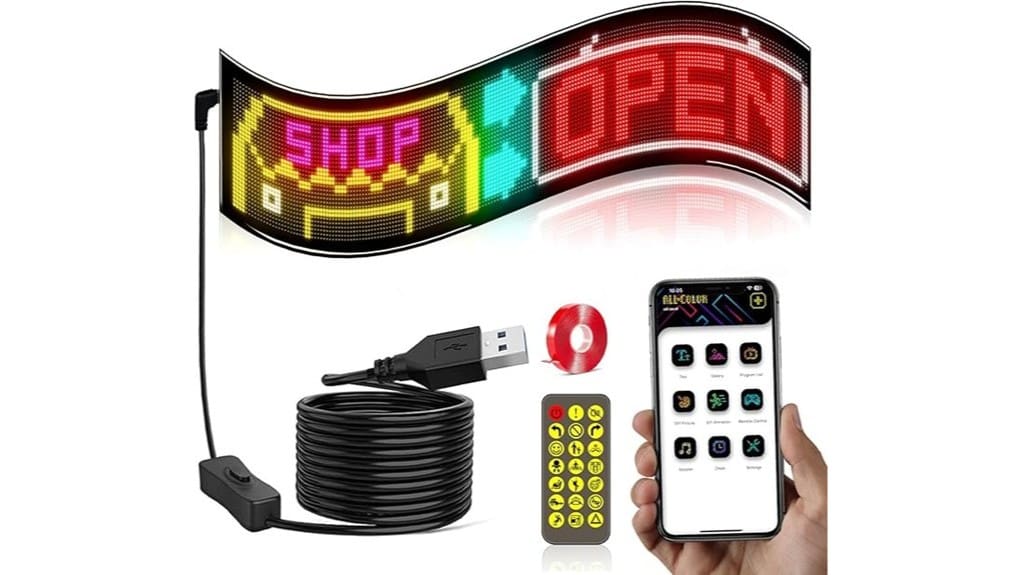
You’ll get a compact, energy‑efficient programmable scrolling LED sign that’s built for continuous messaging with high brightness and low power draw. Pick a model with adequate pixel density and wide viewing angles so characters stay legible at your intended distance. Look for true RGB LEDs, high refresh rates, and an app with secure access plus offline editing. Check IP rating, mounting method, and USB power options for your installation — keep going to see detailed buying criteria and use cases.
Some Key Takeaways
- Check pixel density and panel size to ensure legibility at your intended viewing distance.
- Prioritize true RGB LEDs, high refresh rate, and uniform brightness for smooth color and low flicker.
- Confirm control options: secure app, offline editing, remote, and API for rapid and reliable content updates.
- Verify mounting compatibility, 5V USB power routing, IP rating, and protected ports for durable outdoor use.
- Compare warranty, LED lifetime, replacement policy, and power efficiency for long-term value.
Quick Verdict: Who Should Buy a Programmable Scrolling LED Sign and Why
If you need a compact, energy-efficient way to display dynamic messages, a programmable scrolling LED sign is a strong choice. You’ll get high-brightness output with low power draw, so energy efficiency supports continuous operation without large power infrastructure. It’s ideal if you want modular messaging for storefronts, events, or vehicle signage and you value flexible placements. Use the smart app or remote for rapid content changes. Follow installation tips: apply the supplied high-strength adhesive to smooth, clean surfaces and route the 5V USB cable to a protected outlet. Expect durable, weather-resistant operation for varied environments. These signs pair well with outdoor visibility products to make your message stand out.
Which Display and LED Features Matter Most for Readability and Color Quality?
When you judge a programmable scrolling LED sign for readability and color quality, prioritize pixel density, LED type, and brightness uniformity. You’ll assess pixel density to determine character legibility at intended distances; higher density yields crisper text and finer graphics. Check viewing angle to guarantee consistent luminance off-axis, and verify color gamut to reproduce branded tones accurately. Prefer true RGB LEDs with stable drive circuitry for smooth gradients and low power draw. Evaluate refresh rate to prevent flicker during motion or camera capture. Finally, confirm brightness uniformity across the panel to avoid hotspots that degrade perceived contrast. Also consider ease of installation and compatibility with mounting accessories to ensure the sign works with your display location.
How Control, Customization, and App Features Compare Across Models
After checking display and LED metrics, you’ll want to compare how different models let you control and customize content. Evaluate app security protocols, authentication, and permission granularity to protect remote updates and multi-user access. Check whether the smart app supports Offline editing so you can compose and queue content without connectivity, then sync when online. Assess available presets, scripting for dynamic effects, font and language support, and latency between app commands and sign response. Verify alternative control options like included remote. Prioritize models offering robust API hooks, regular firmware updates, and clear change logs for predictable, innovative deployments. Consider supplier resources like designing eye-catching guides that help users create effective messages for programmable signs.
Installation, Power, Waterproofing, and Durability: What to Check Before Buying
Because proper installation and environmental resilience determine long-term performance, you should verify mounting method compatibility, power logistics, and ingress protection before buying. Check that adhesive or resin mounting works with intended mounting surfaces (glass, metal, wood) and that the nail-free system tolerates texture and load. Confirm the universal 5V USB power source length and routing options for clean integration. Assess weather resistance ratings (IP65) and note vulnerable ports like USB that need shielding. Factor durability into a maintenance schedule addressing epoxy wear, adhesive reapplication, and periodic waterproof inspections to sustain reliable operation. Also consider choosing bases specifically designed for wind-resistant conditions to keep signs standing in gusts and storms.
Use-Case Recommendations and Buying Checklist: Choose the Right Sign for Your Needs
Although your exact application will dictate priorities, start by matching display size, pixel density, and brightness to viewing distance and environment so your message remains legible and color-accurate. For storefronts pick larger panels with higher pixel counts; for vehicle or window mounts prefer flexible boards and IP65 protection. Verify font compatibility for brand typography and confirm smart-app features, animations, and multilingual support. Check installation method and USB power reach for intended placement. Review warranty terms, LED lifetime, and replacement policy. Prioritize low power draw with high brightness for continuous operation. Use this checklist to align technical tradeoffs with your use case. Bright, even illumination can change how your sign is perceived, so consider backlit letter boards for enhanced visibility and aesthetic appeal and learn more about backlit letter boards.
Some Questions Answered
Can Multiple Signs Sync Together for Coordinated Displays?
Yes — you can sync multiple signs for coordinated displays. You’ll use wireless synchronization for real-time alignment or timecode triggering for frame-accurate playback across units. The smart app and remote support group pairing; make sure each sign’s firmware and network link are updated. For complex installations, set one unit as master timecode source or use centralized scheduling via the app to maintain deterministic, low-latency synchronization across displays.
What Warranty and Customer Support Options Are Offered?
You get a limited warranty covering defects for a defined warranty duration (typically 12 months), plus extended options in some regions. Customer support is available via email, app chat, and phone for setup, syncing, and troubleshooting. Firmware updates and online documentation are provided. Warranty excludes physical damage and non-waterproof port areas. You’ll receive return/repair instructions and remote diagnostics to minimize downtime and guarantee coordinated displays.
Are There Restrictions on Brightness in Residential Areas?
Yes — you’ll need to follow local ordinances and avoid creating light pollution or provoking community complaints. You can reduce impact by lowering brightness, scheduling dimming at night, and angling the display away from neighbors. The sign’s high-brightness, low-power LEDs and app-controlled dimming let you meet residential limits while keeping visual quality. Check municipal codes and neighborhood rules before installation to guarantee compliance and prevent disputes.
Can Signs Be Programmed Offline Without the App?
Yes — you can program signs offline without the app using onboard controls and the included remote; you’ll upload patterns, text, and local scheduling directly to internal memory. The system supports USB file transfer and autonomous playback, and it can resume schedules after outages if you add battery backup. You’ll get deterministic behavior, reduced network dependency, and reliable operation for venues prioritizing security and predictable display timelines.
What Data Privacy Measures Does the App Implement?
The app secures communications with encrypted transmission (TLS) for commands and media, and stores only anonymized logs for diagnostics and usage metrics. You’ll authenticate locally or via optional account tokens; credentials aren’t retained in plain text. Firmware updates are signed, and telemetry is minimized with configurable opt-out. USB-connected programming can avoid cloud exposure. You’ll get periodic transparency reports and can request data export or deletion per privacy controls.


